
Overview
You can export your project in four formats:- HTML: a single self-contained web page you can open locally or host anywhere. Free on all plans.
- React: the full source code of your project as a ready-to-run React app. Free on all plans.
- PDF and PowerPoint (
.pptx): high-quality slide captures for sharing offline, printing, or editing in another tool. Free on all plans.
How to export
- Open your project in the editor
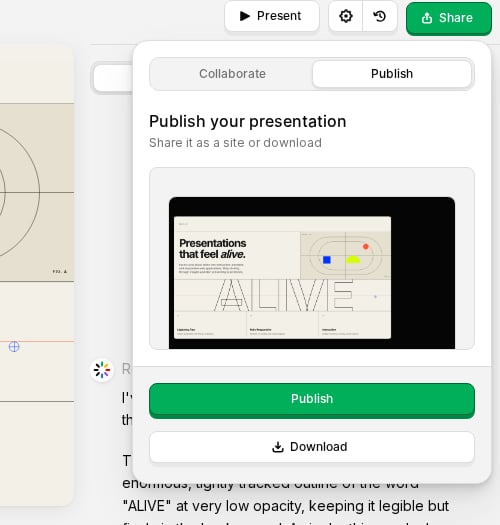
- Click Share in the top bar
- Open the Publish tab
- Click Download
- Choose HTML, React, PDF, or PowerPoint
HTML export
A single.html file containing your entire project: slides, styles, fonts, and navigation. Open it in any browser or upload it to any static host. Interactive behavior (slide navigation, animations) keeps working; an internet connection is needed the first time to load shared libraries.
React export
A.zip with your project as a complete React app (Vite + Tailwind CSS):
src/faces/<faceId>/face.tsx: one React component per slide, with its content and controls alongside- Run it with
npm install && npm run dev - Build for production with
npm run build
PDF export
What’s included
- One page per slide in landscape orientation
- High-quality JPEG rendering of each slide
- All animations settled to their final state before capture
PowerPoint export
What’s included
- One slide per face in a standard
.pptxfile - Fonts used in your slides embedded when possible (common system fonts are referenced rather than embedded)
- Images and layout preserved from the live render
- Editable in Microsoft PowerPoint, Keynote, and similar tools
Tips
- Review your slides in the editor before exporting; exports capture the current state of your project.
- For the best results, make sure text and images look correct at the slide size you use for publishing.
- If a slide has animations, they are captured in their final (settled) position.
- Large decks may take longer; keep the Share popover open until the download completes.