> ## Documentation Index
> Fetch the complete documentation index at: https://faces.app/docs/llms.txt
> Use this file to discover all available pages before exploring further.
# SEO & Discoverability
> Make your published project findable on Google and other search engines.
## Overview
By default, published projects are accessible via their link but not indexed by search engines. You can change this with the **Discoverable on the web** toggle.
## Enabling discoverability
1. Click **Share** in the editor top bar
2. Open the **Publish** tab
3. Click **Settings**
4. Turn on **Discoverable on the web**
When enabled:
* Search engines (Google, Bing, etc.) can crawl and index your content
* Your project may appear in search results
* Your sitemap is automatically generated
When disabled, your project is still accessible via direct link; it just will not show up in search results.
Discoverability requires a paid plan.
## Social link preview
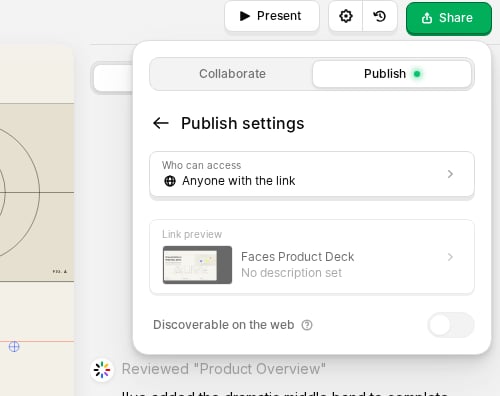 From **Share → Publish → Settings → Link preview**, you can also customize how your project appears when shared on social networks and messaging apps: title, description, preview image, and favicon. (Customizing the link preview also requires a paid plan.)
## Setup by domain type
### Faces subdomains
If your project is on a Faces subdomain (e.g., `yourproject.faces.site`):
1. Toggle **Discoverable on the web** on
2. Publish your project
3. Indexing is handled automatically
### Custom domains
If you're using a [custom domain](/en/guides/custom-domains):
1. Enable discoverability and publish
2. Verify domain ownership in [Google Search Console](https://search.google.com/search-console)
3. Submit your URL for indexing
4. Monitor performance in Search Console
### Multiple presentations on one domain
If you have multiple presentations published on the same custom domain, submit your sitemap to Google Search Console:
```
yourdomain.com/sitemap.xml
```
This sitemap is generated automatically and lists every **discoverable** presentation on your domain (those with the **Discoverable on the web** toggle enabled), like a table of contents for search engines, helping them discover your content faster.
## Tips
* Use descriptive project titles and slide content; search engines index your text.
* Custom domains tend to rank better over time than subdomains.
* Check Google Search Console regularly to monitor indexing status and fix any issues.
From **Share → Publish → Settings → Link preview**, you can also customize how your project appears when shared on social networks and messaging apps: title, description, preview image, and favicon. (Customizing the link preview also requires a paid plan.)
## Setup by domain type
### Faces subdomains
If your project is on a Faces subdomain (e.g., `yourproject.faces.site`):
1. Toggle **Discoverable on the web** on
2. Publish your project
3. Indexing is handled automatically
### Custom domains
If you're using a [custom domain](/en/guides/custom-domains):
1. Enable discoverability and publish
2. Verify domain ownership in [Google Search Console](https://search.google.com/search-console)
3. Submit your URL for indexing
4. Monitor performance in Search Console
### Multiple presentations on one domain
If you have multiple presentations published on the same custom domain, submit your sitemap to Google Search Console:
```
yourdomain.com/sitemap.xml
```
This sitemap is generated automatically and lists every **discoverable** presentation on your domain (those with the **Discoverable on the web** toggle enabled), like a table of contents for search engines, helping them discover your content faster.
## Tips
* Use descriptive project titles and slide content; search engines index your text.
* Custom domains tend to rank better over time than subdomains.
* Check Google Search Console regularly to monitor indexing status and fix any issues.