> ## Documentation Index
> Fetch the complete documentation index at: https://faces.app/docs/llms.txt
> Use this file to discover all available pages before exploring further.
# Export (PDF & PowerPoint)
> Download your project as a PDF or PowerPoint file for offline sharing.
## Overview
On any **paid plan** (Plus or Pro), you can export your project as a high-quality PDF or PowerPoint (`.pptx`) file. This is useful for sharing offline, printing, attaching to emails, or editing slides in another tool.
## How to export
1. Open your project in the editor
2. Click **Share** in the top bar
3. Open the **Publish** tab
4. Click **Download**
5. Choose **PDF** or **PowerPoint**
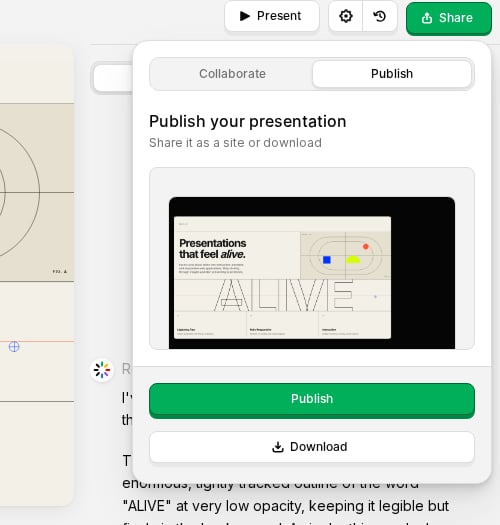 The export runs on our servers and downloads automatically when ready.
Export is available on paid plans.
## PDF export
### What's included
* One page per slide in landscape orientation
* High-quality JPEG rendering of each slide
* All animations settled to their final state before capture
## PowerPoint export
### What's included
* One slide per face in a standard `.pptx` file
* Fonts used in your slides embedded when possible (common system fonts are referenced rather than embedded)
* Images and layout preserved from the live render
* Editable in Microsoft PowerPoint, Keynote, and similar tools
PowerPoint exports are assembled server-side from your project's current slides, similar to PDF export.
## Tips
* Review your slides in the editor before exporting; exports capture the current state of your project.
* For the best results, make sure text and images look correct at the slide size you use for publishing.
* If a slide has animations, they are captured in their final (settled) position.
* Large decks may take longer; keep the Share popover open until the download completes.
The export runs on our servers and downloads automatically when ready.
Export is available on paid plans.
## PDF export
### What's included
* One page per slide in landscape orientation
* High-quality JPEG rendering of each slide
* All animations settled to their final state before capture
## PowerPoint export
### What's included
* One slide per face in a standard `.pptx` file
* Fonts used in your slides embedded when possible (common system fonts are referenced rather than embedded)
* Images and layout preserved from the live render
* Editable in Microsoft PowerPoint, Keynote, and similar tools
PowerPoint exports are assembled server-side from your project's current slides, similar to PDF export.
## Tips
* Review your slides in the editor before exporting; exports capture the current state of your project.
* For the best results, make sure text and images look correct at the slide size you use for publishing.
* If a slide has animations, they are captured in their final (settled) position.
* Large decks may take longer; keep the Share popover open until the download completes.